

Permission table
Repository permissions
Organization permissions
All permissions are set at install time via the GitHub App manifest. You can verify them at any time in GitHub Settings > Applications > MergeWatch > Permissions.
What MergeWatch does NOT request
Equally important is what the app cannot do. These permissions are intentionally excluded.No commits, branches, or files
MergeWatch never pushes commits, creates or deletes branches or tags, modifies files, opens or merges pull requests, or changes repository settings.
Contents: read & write is granted only because GitHub routes review-thread resolution through it.No secrets: read
MergeWatch cannot access repository or organization secrets. It has zero visibility into your CI/CD credentials, tokens, or environment variables.
No actions: write
MergeWatch cannot trigger, cancel, or modify GitHub Actions workflows. It operates entirely outside your CI/CD pipeline.
Webhook events
MergeWatch subscribes to the following webhook events. Each event triggers a specific, scoped action. All other events are acknowledged with200 OK and ignored.
See Webhook Events for the exact action-level handling per event.
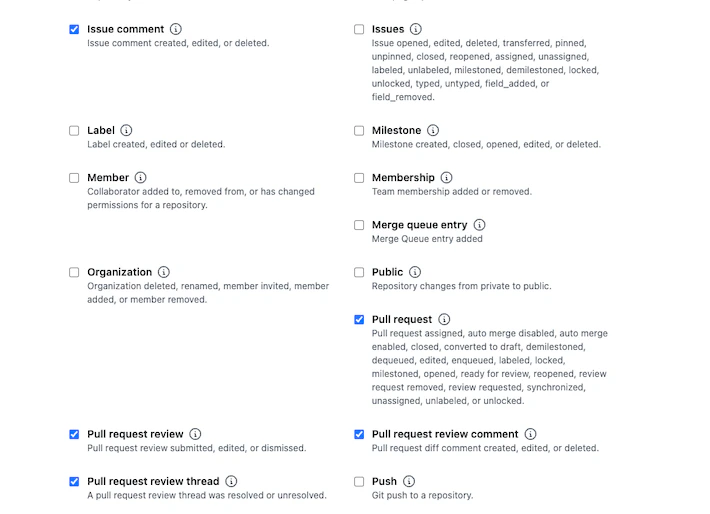
Webhook event subscriptions — the checked events are the ones MergeWatch requires.
Security model
MergeWatch is designed so that sensitive credentials are never embedded in code, environment variables, or Lambda configuration.Zero API keys in the runtime
GitHub credentials (App ID, private key, webhook secret) are stored in AWS SSM Parameter Store, encrypted at rest with AWS KMS. The Lambda function reads them at invocation time via the SSM API — they are never baked into the deployment artifact. Amazon Bedrock authentication uses the Lambda execution role (IAM instance profile). There are no Bedrock API keys to manage, rotate, or leak.Webhook signature validation
Every incoming webhook is validated using HMAC-SHA256 before any processing occurs. Requests with missing or invalid signatures are rejected immediately. This prevents spoofed payloads from triggering the review pipeline.IAM permissions are tightly scoped
The Lambda execution role follows least-privilege IAM policy design.The IAM policy is defined in the SAM template and deployed via CloudFormation. You can audit the exact permissions in the
template.yaml file of the MergeWatch repository.Frequently asked questions
Can MergeWatch modify my code?
Can MergeWatch modify my code?
No. MergeWatch requests
contents: read & write, but the write half is used for exactly one thing — resolving and unresolving review threads MergeWatch itself created. It cannot push commits, create branches, or modify any file. The other write operations are posting review comments (pull_requests: read & write) and creating check runs (checks: read & write). Declining the contents write permission is supported; only thread tidying is lost.Does MergeWatch store my source code?
Does MergeWatch store my source code?
No. Diffs are read from the GitHub API, processed in memory during the Lambda invocation, and discarded. No source code is written to DynamoDB, S3, or any other persistent store.
Can I restrict which repositories MergeWatch accesses?
Can I restrict which repositories MergeWatch accesses?
Yes. During installation, select Only select repositories instead of All repositories. You can change this at any time in GitHub Settings > Applications.
How do I audit what MergeWatch is doing?
How do I audit what MergeWatch is doing?
Three places to look: GitHub webhook delivery logs show every event sent to the app. CloudWatch Logs capture the full Lambda execution trace. Bedrock invocation logs (if enabled) show every model call and its input/output.